
Many website administrators falsely believe that installing a popular caching plugin will permanently resolve all slow page loading issues. True performance actually requires careful server-level adjustments, because simple caching cannot repair inefficient backend code or incorrect memory limits that consistently trigger total system crashes under heavy loads.
Key Takeaways:
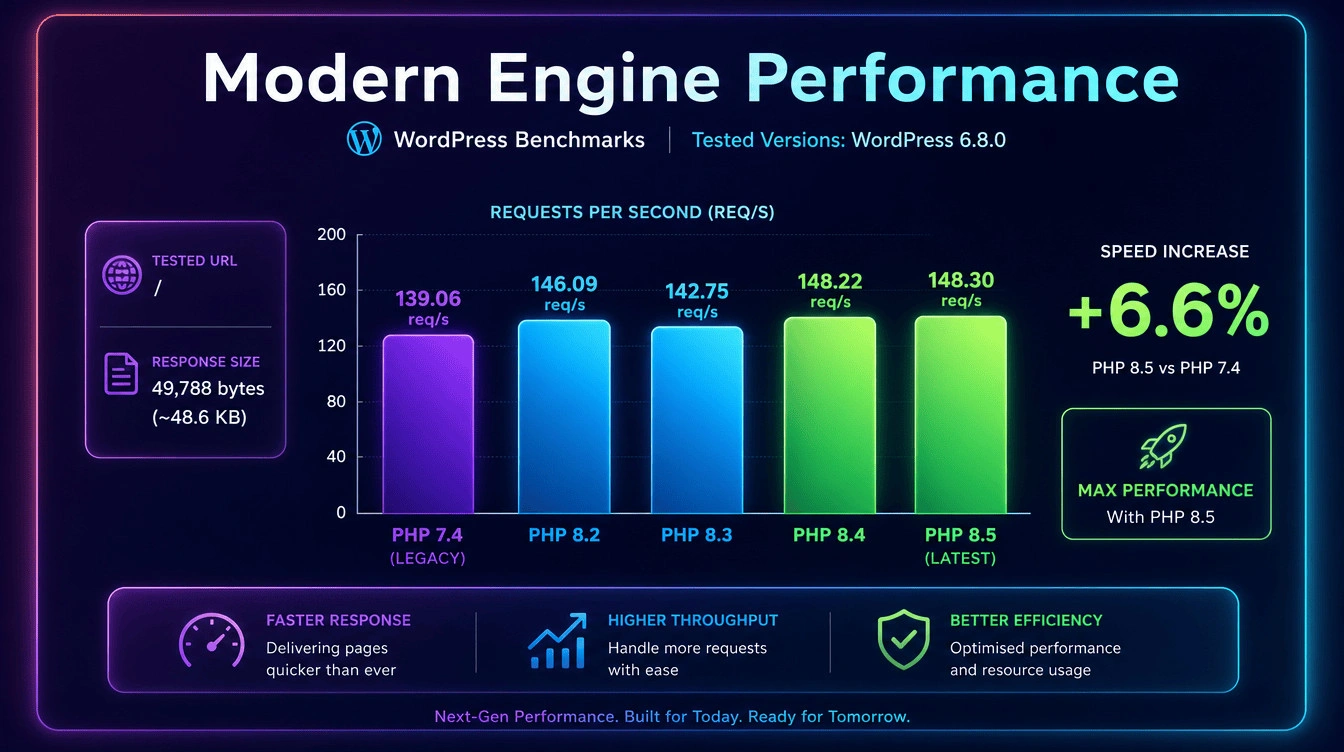
- Upgrading to version 8.4 immediately provides significant baseline speed improvements over older legacy versions that are no longer supported.
- Configuring the OPcache memory allocation stops the web server from wastefully compiling the exact same code files repeatedly during peak traffic times.
- Switching process managers to dynamic or static FastCGI worker pools prevents frustrating timeout errors when visitor numbers suddenly increase beyond normal capacity.
- Increasing the default backend memory limits safely accommodates heavy transactional operations like complex checkout pages on bustling eCommerce stores.
The Importance of PHP Performance Tuning for High-Traffic Sites
Organisations operating busy corporate portals or thriving online stores quickly discover that optimising their foundational server settings dramatically improves overall user experiences, which ultimately helps prevent disastrous application crashes during sudden traffic spikes. Malaysian business owners managing operations registered with the SSM often underestimate the massive strain placed on local hosting environments when hundreds of shoppers simultaneously attempt to purchase items. You must establish proper WordPress security and hosting foundations to ensure that your underlying server architecture possesses enough processing power to manage sudden bursts of concurrent connections efficiently.
How Does PHP Power the WordPress Architecture?
Every time a user requests a web page, the backend server must actively process the core scripts, query the database, and render the final HTML output before sending it across the network. The official PHP manual explains that this continuous cycle of compiling and executing code creates substantial overhead, which can severely restrict your overall throughput capacity if configured poorly. Building a highly responsive technical SEO architecture requires understanding how the application layer handles these execution loops to prevent simple functions from monopolising your available server resources indefinitely.
The Real Cost of Poor Server Performance at Scale
Slow server response times directly damage user engagement because impatient visitors will quickly abandon your online store if they must wait several seconds for a single product image to appear on screen. When your checkout process stalls during a major promotional event, you lose significant revenue while simultaneously damaging your brand reputation among frustrated consumers trying to spend their hard-earned MYR. Failing to address these underlying infrastructural issues simply introduces the hidden cost of cheap web development, where unoptimised code silently drains your marketing budget through terrible conversion rates.
What Are Key Performance Benchmarks for High-Traffic Sites?
Engineers typically measure backend efficiency by tracking the Time to First Byte metric, which reveals exactly how long the server takes to process the initial request and begin transmitting data back. Following official Time to First Byte guidelines, a highly tuned hosting environment should ideally generate an initial response within two hundred milliseconds to pass modern core web vitals assessments comfortably. Professional speed optimisation servicesroutinely monitor these specific timing metrics because high latency periods clearly indicate that the server hardware is struggling to process the requested scripts adequately.
Common Bottlenecks That Kill Server Operations Under Load
Unoptimised databases frequently cause severe processing delays because poorly written plugins often execute dozens of duplicate queries instead of storing the requested information efficiently within a persistent object cache system. Heavy page builders like Elementor can also exhaust available memory limits quickly, forcing the server to terminate background processes abruptly to protect the remaining system stability from catastrophic failure. To prevent these recurring bottlenecks from crippling your operations, you should invest in proper custom web development services that prioritise clean coding standards over bloated visual functionality.
Q: Why does my server crash specifically during the checkout process?
A: Checkout pages completely bypass static caching layers, forcing your server to process complex database queries directly in real time. If the backend memory limits are too low, the system simply runs out of available resources and abruptly terminates the connection before the transaction finishes.
Benchmark and Diagnose Before You Configure
Essential Profiling Tools for Diagnostics
Administrators cannot fix invisible problems, meaning you must install professional diagnostic tools like Xdebug or Blackfire to accurately measure how long individual functions take to execute during a standard page load. These advanced profiling utilities generate detailed performance graphs that highlight exactly which specific plugins or themes are consuming the highest amount of CPU cycles on your dedicated server or VPS. Utilising robust server management solutions guarantees that your technical team has access to the precise diagnostic data needed to perform targeted tuning rather than guessing at random configuration changes.
How Do You Identify Your Biggest Bottlenecks?
You can identify critical performance bottlenecks by enabling slow query logs within your database configuration, which automatically records any specific database request that takes longer than a few seconds to complete entirely. Reviewing the error logs generated by your web server also reveals hidden memory exhaustion errors and fatal script timeouts that silently disrupt user sessions without displaying obvious warning messages. Scheduling a comprehensive site audit analysis allows external experts to review these log files objectively and pinpoint the exact source of your recurring stability issues.
Q: Can I use basic performance testing tools to find backend issues?
A: Basic testing tools usually only measure frontend rendering speeds rather than underlying server delays. You must employ dedicated profiling software to accurately locate the specific code functions causing high CPU load and memory exhaustion across your hosting infrastructure.
Upgrading To The Latest Scripting Versions
Running an old software engine on a modern shop is exactly like putting a lawnmower engine inside a massive racing car and expecting the vehicle to win a fast race against professionals. The latest official PHP 8.5 release includes completely new ways to handle math and data, which means your pages will load almost instantly without forcing you to pay for expensive hardware upgrades. Old versions of the code actually stop working properly after a few years, which leaves your entire business open to dangerous attacks that could steal important customer information from your databases.
Companies registered with the SSM in Malaysia must ensure that their digital assets remain safe, and updating the core software is the absolute best way to protect your business reputation from damage. If you need help checking your current setup, you should look at our free audit service to see exactly which parts of your digital system need immediate improvements to run smoothly.
Should You Choose Version 8.4 Or 8.5 Today?
Since we are now in the middle of 2026, the completely new version 8.5 exists as the absolute bleeding-edge release for technology enthusiasts who want the maximum possible speed improvements today. However, version 8.4 remains the absolute safest stable choice for complicated shopping carts, because thousands of developers have already tested their custom code to guarantee nothing breaks unexpectedly during checkout. Switching to version 8.4 gives you a fantastic balance between incredible loading speeds and solid reliability, while avoiding the dangerous bugs that often hide inside brand new bleeding-edge software releases.
You must always test any new engine on a hidden copy of your website before you make the changes live, because breaking your main shop during a busy sale will cost thousands. Using the PageSpeed Insights tool helps you see exactly how the new software changes your loading times, so you can prove to your boss that the upgrade actually makes a big difference. We wrote a detailed technical guide to featured snippets that explains how fixing your website speed actually helps Google put your articles at the top of the search results for major keywords.
Q: Which version runs online shops the best?
A: Version 8.4 processes complicated shopping carts safely and extremely fast, while version 8.5 provides experimental speeds that might accidentally break older custom plugins before the developers release new official updates.
OPcache Configuration for Maximum Efficiency
What Is OPcache and How Does It Reduce Overhead?
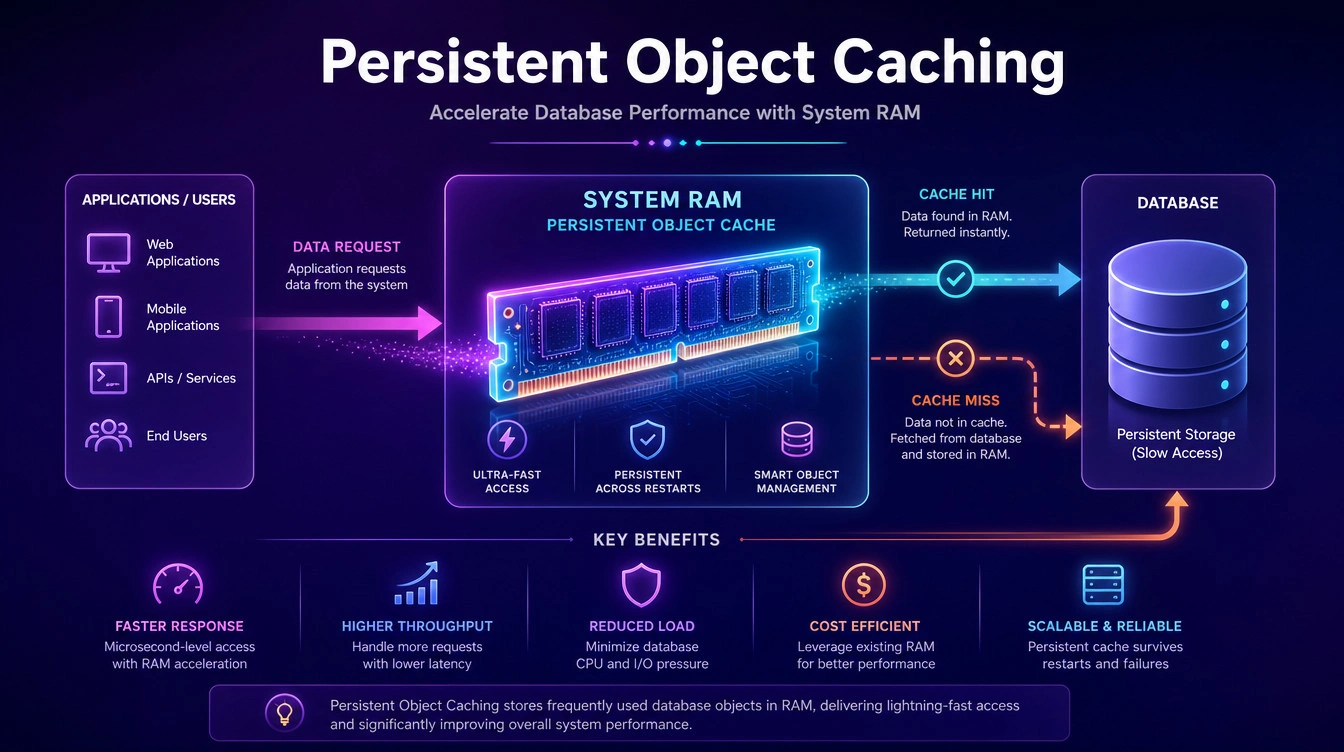
By default, the server must parse and compile source code files upon every single request, which wastes an enormous amount of processing power when thousands of users load the identical page simultaneously. Enabling the OPcache module stores the precompiled script bytecode directly within the shared memory layer, completely eliminating the redundant compilation steps and drastically reducing overall server latency during peak traffic periods. You can review the official OPcache configuration documentation to understand how adjusting the various validation directives controls exactly when the system checks for modified files on the disk drive.
Optimal Memory Allocation Settings
You must allocate sufficient RAM to the memory consumption directive, ensuring the system has enough space to store all your compiled application files without constantly evicting older data to make room. Increasing the interned strings buffer allows the caching engine to store repetitive text variables efficiently, which is particularly useful for extensive eCommerce catalogues containing thousands of similar product descriptions and category names. Performing a free technical audit typically reveals whether your current caching allocation is adequately sized to handle the massive volume of scripts generated by complex page building tools.
Q: How do I know if my OPcache settings are actually working?
A: You can review your active memory hit rates by installing a simple status script on your server dashboard. A properly tuned configuration should consistently show a hit rate above ninety percent during normal daily operations, indicating minimal code recompilation.
PHP-FPM Tuning for High-Concurrency Traffic
Why Does PHP-FPM Beat Alternative Handlers for Speed?
The FastCGI Process Manager completely outperforms older Apache modules because it spins up dedicated background worker processes that handle incoming requests independently, significantly reducing the memory footprint of the main web server. This modern architecture allows the system to serve static image assets efficiently while routing only the complex dynamic requests to the background workers, preventing heavy processing tasks from blocking incoming network connections. Implementing professional enterprise WordPress security tactics often requires configuring these isolated resource pools carefully to prevent malicious botnets from easily overwhelming your available processing capacity.
Configuring Pool Settings and Process Management
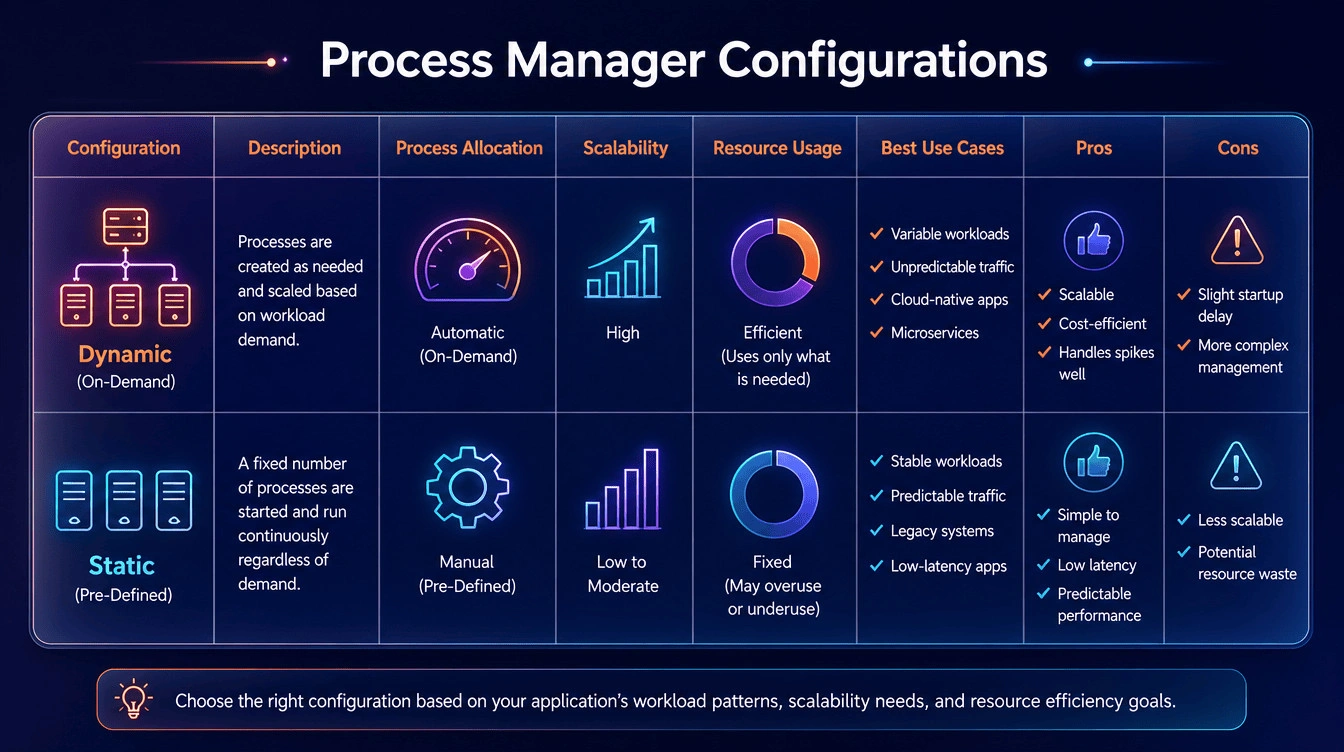
| Process Manager Type | Ideal Server Environment | Resource Consumption Behaviour | Best Use Case Scenario |
|---|---|---|---|
| Dynamic | VPS or Dedicated Servers | Spawns and kills workers based on active traffic demands. | Sites experiencing fluctuating visitor numbers throughout the day. |
| Static | High-End Dedicated Servers | Keeps a fixed maximum number of workers running constantly. | Massive corporate portals requiring maximum throughput continuously without startup delays. |
| Ondemand | Shared Hosting Platforms | Kills all idle workers to free up RAM completely. | Low-traffic staging environments with strict memory limitations. |
Administrators must calculate the maximum children directive carefully by dividing the total available server RAM by the average memory consumed by a single running worker process during normal operations. Setting the starting servers and spare server limits correctly ensures the application pool always maintains enough idle workers ready to handle unexpected traffic spikes without forcing users to endure frustrating startup delays. Managing these complex pool configurations usually requires assistance from a knowledgeable agency, which is why website maintenance costs in Malaysia vary depending on the level of dedicated technical support required.
Q: Should I use dynamic or static process management?
A: Static management works best for powerful dedicated servers because it keeps worker processes permanently active and ready. Dynamic management suits smaller VPS environments better by automatically releasing unused memory resources back to the operating system when overall traffic volumes temporarily decrease.
Optimising Settings for Heavy Loads
How Much Memory Does Your Installation Actually Need?
The default WordPress memory limit often sits far too low for modern digital operations, causing frustrating blank screens when administrators attempt to upload high-resolution images or export large customer databases. The WordPress Hosting team recommendations suggest setting a minimum of 128 megabytes for standard installations, while heavily modified online stores using WooCommerce typically require 512 megabytes to process complex carts smoothly. Proper dedicated WooCommerce support and maintenance teams always monitor these specific memory ceilings to guarantee that background scheduled cron jobs finish successfully without triggering unexpected memory exhaustion errors.
Execution Time and Maximum Input Tuning
When executing extensive plugin updates or importing massive product spreadsheets, the default thirty-second maximum execution time limit will frequently terminate the ongoing script prematurely, resulting in broken database tables and missing files. You must increase both the maximum execution time and the maximum input variables limit within your primary configuration file to accommodate the heavy administrative tasks required to run a massive digital business. Establishing a routine website maintenance schedule ensures that these critical limits are periodically reviewed and adjusted as your active plugin count and overall database size inevitably grow over time.
Q: Can I just set my memory limit to an unlimited value permanently?
A: Setting an unlimited memory value puts your entire infrastructure at massive risk. A single broken script could consume all available server resources infinitely, crashing the entire machine and taking down every hosted website simultaneously without warning.
Database Query Optimisation at Scale
How Does the Backend Interact with MySQL?
Every time a visitor requests dynamic content, the application layer sends structural queries to the database engine, forcing the hard drive to locate the specific records and return them for processing. The MySQL official documentationhighlights that failing to index your database tables properly forces the engine to scan every single row sequentially, resulting in severe processing delays as your total data grows. Engaging in a strategic website redesign playbook allows you to refactor poorly structured queries and eliminate redundant database calls that needlessly consume valuable processor time during peak hours.
Persistent Object Caching to Minimise Redundant Calls
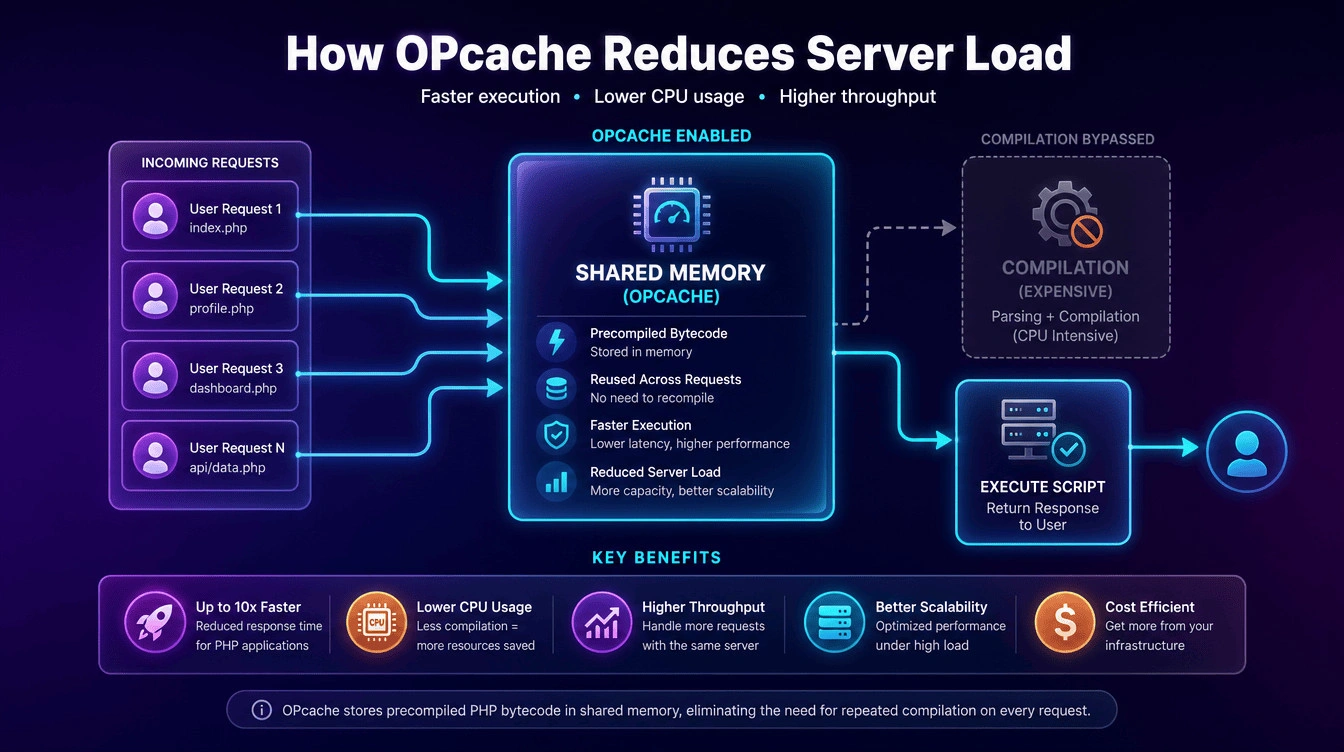
Installing a persistent object caching system like Redis or Memcached allows the server to store the results of complex database queries directly in the system RAM for rapid future retrieval. When another user requests the exact same data, the application bypasses the slow database entirely and instantly serves the stored result from memory, dramatically reducing the overall load on your database daemon. You can review Redis persistent object caching guides or Memcached memory object caching system manuals to understand how implementing these advanced memory stores permanently accelerates dynamic page generation speeds.
Q: Will adding more RAM automatically fix my slow database queries?
A: Throwing additional RAM at an unoptimised database will only mask the underlying structural problem temporarily. You must restructure the specific queries and add proper indexing to truly resolve the severe processing delays permanently.
Frequently Asked Questions
Can performance tuning lower my overall web hosting costs?
Yes, properly optimising your application layer significantly reduces raw CPU load and RAM usage. Reducing resource consumption allows you to accommodate larger audiences on your existing infrastructure without continually paying for unnecessary hardware upgrades.
How do I measure improvements after applying these configuration changes?
You should utilise professional tools like Google PageSpeed Insights and New Relic to monitor your Time to First Byte and backend response metrics. Comparing the data before and after making adjustments provides clear, quantifiable evidence of your success.
Should I edit my server configuration files directly if I am inexperienced?
Modifying core server files directly can easily break your entire hosting environment if you make a simple syntax error. You should always consult a qualified server administrator or employ a staging environment to test any technical changes safely.
Next Steps
- Audit Your Current PHP Version: Log into your hosting control panel immediately and verify that your server is running version 8.4 or higher, scheduling an upgrade during off-peak hours if necessary.
- Enable and Configure OPcache: Modify your configuration file to activate the OPcache module, ensuring you allocate at least 128 megabytes of memory to store your compiled application scripts effectively.PHP
- Adjust Your Process Manager Limits: Review your FastCGI settings and switch to a dynamic worker pool, calculating your maximum children limit carefully based on your total available server memory and average traffic volume.
If you are struggling to keep your corporate portal or online store stable during major traffic surges, contact our expert technical team today to schedule a comprehensive server performance audit and permanently resolve your backend bottlenecks.